

Ever tried to turn a story idea, a dragon who's afraid of fire, a girl who talks to stars, into an actual illustrated book? The gap between "great idea" and "finished storybook" used to require a designer, an illustrator, and a publisher. In 2026, a good storybook creator can do all three in an afternoon.
But not all storybook tools are built the same. Some are glorified slideshow apps. Others give you beautiful illustrations but no real story structure. And a few, the ones worth your time, handle the whole creative arc from first sentence to printed book.
We've tested six of the most popular storybook creator tools available right now, comparing them on the things that actually matter: ease of use, AI art quality, narrative features, print quality, and price. Whether you're a parent making a personalized gift, an educator building classroom resources, or a first time children's book author, this guide will help you choose the right one.
Try Story Spark, it's the tool we recommend most, and your first story is free to start.
What to Look for in a Storybook Creator
Before we get into the tools, it's worth being clear about what separates a genuinely good storybook creator from a basic template builder.
Narrative support
A storybook isn't a photo album or a slideshow, it has a beginning, middle, and end. The best tools guide you through building that structure, rather than leaving you with a blank canvas and hoping for the best.
AI illustration quality
Consistency matters enormously: if your main character looks completely different on page three versus page seven, the magic is broken. Look for tools that maintain character appearance across the whole book.
Print quality and fulfilment
Some tools create beautiful on screen books that produce blurry, pixelated prints. If you want a physical book, verify that the tool can deliver.
Ease of use
Some tools assume you already know design; others walk you through every step. Your ideal tool depends on your starting point and how much time you want to spend.
Price and flexibility
Free tiers are common but often heavily restricted. Check what you're actually getting before you invest time building something you can't export without paying.
The 6 Best Storybook Creator Tools in 2026
1. Story Spark, Best Overall Storybook Creator
Best for: Parents, educators, and first time authors who want a complete story to print experience.
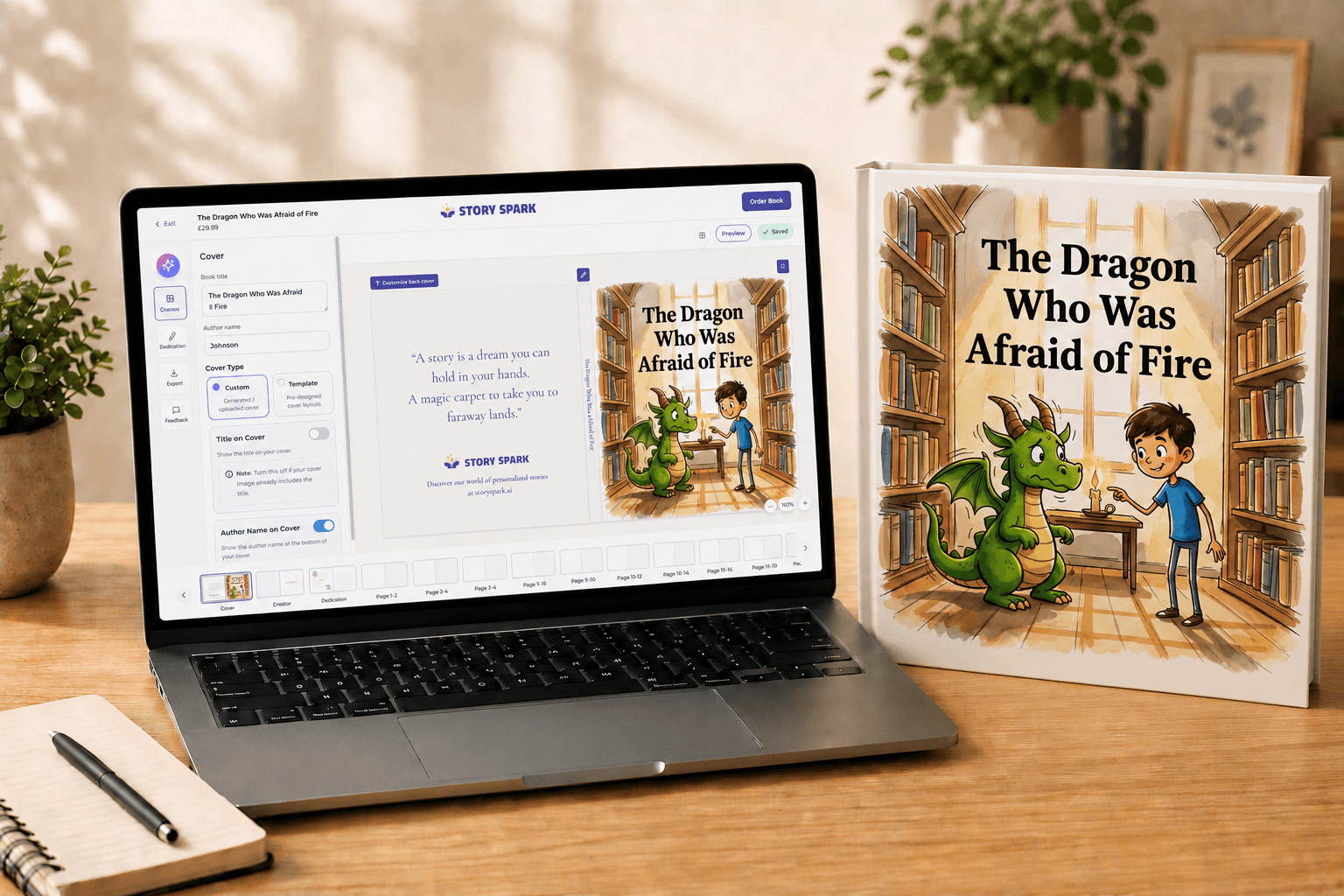
Story Spark was built from the ground up as a storybook creator, not repurposed from a presentation app or a generic design tool. That design philosophy shows immediately when you start using it.
The platform guides you through story creation with a clear narrative structure: character setup, story arc, scene by scene illustration, and final book assembly. You don't need any design experience. The AI handles illustration generation, and critically, it maintains visual consistency across every page, so your protagonist looks like themselves throughout the whole book. This is the single biggest differentiator between Story Spark and most of its competitors.
The AI illustration engine is genuinely impressive. You can choose from multiple art styles, watercolour, cartoon, storybook flat, and more, and the tool generates original illustrated scenes rather than relying on stock imagery. Each scene is editable, so you can regenerate individual pages without disrupting the rest of the book.
For educators, Story Spark has built specific features around classroom use, including curriculum aligned story prompts and the ability to create multiple books under a single account. If you're using storybooks as a literacy tool, this saves significant preparation time.
Print quality is where Story Spark really earns its reputation. Books are printed on premium matte paper with a hardcover or softcover option, and the fulfilment is handled end to end, you receive a professionally printed book, not a PDF to take to a local printer. Delivery is typically 5 to 7 business days in the UK.
Price: Free to start; printed books from 29.99. Premium digital subscriptions available for educators and frequent creators.
5
Excellent
2. Book Creator, Best for Educators Building Digital Libraries
Best for: Teachers and schools creating digital first books for classroom use.
Book Creator has been a classroom staple for years, and it earns that reputation in the digital space. It's a well designed tool that lets you build multimedia books combining text, images, audio, and video, and the interface is clean and approachable for older children and teachers alike.
Where Book Creator falls short is in storytelling specific features. It's essentially a flexible page by page builder, which gives you a lot of freedom but very little guidance. There's no narrative structure built in, no AI illustration engine that maintains character consistency, and creating a genuinely illustrated children's story from scratch requires significant manual effort.
The AI features added in recent updates are useful but limited, you can generate individual images, but they don't connect to a broader story context. You're doing the creative heavy lifting yourself.
For schools building digital libraries of non fiction resources, Book Creator is excellent. For parents or authors who want to create narrative picture books, the gap between it and a purpose built storybook creator like Story Spark is significant.
Price: Free tier (limited books); paid plans from £10/month for teachers.
3
Average
3. Canva, Best for Design Confident Users Who Already Know the Platform
Best for: Designers or advanced users who want full creative control.
Canva is a brilliant general purpose design tool that happens to have book and storybook templates. If you're already a confident Canva user, you can create something beautiful, but the experience requires significant design knowledge, and there's nothing specific to the storytelling process.
The AI image generation (via Magic Media) can produce attractive individual illustrations, but consistency across multiple pages is a known issue. Generated characters don't carry over between prompts, meaning your main character is likely to look different on every page unless you're very precise with your prompting.
Canva has no print on demand integration for children's books specifically, you'd need to export your finished pages (at the right resolution) and use a third party printer, which adds cost and complexity.
If you want total control and already live in Canva, it can work. For anyone who doesn't already use it regularly, the learning curve and the limitations in narrative and print workflow make it a poor choice as a primary storybook creator.
Price: Free tier available; Canva Pro from £10.99/month.
2.5
Fair
4. Wonderbly, Best for Highly Personalized Gift Books
Best for: Parents or gift givers who want a polished, professionally illustrated personalized book.
Wonderbly occupies a different part of the market. It doesn't give you a blank canvas creative tool, instead, it offers a curated library of pre written, beautifully illustrated story templates that you personalize with a child's name, appearance, and details.
The illustration quality is exceptional, and the print quality is among the best in this list. The books genuinely look and feel like high quality published children's books. For a birthday or Christmas gift, Wonderbly is hard to beat.
The limitation is creative freedom. You're choosing from existing stories, not creating your own. You can't write your own narrative, change the plot, or create a completely original character. If you want to tell a specific story, about your child's actual life, a family adventure, or a topic you care about, Wonderbly can't do that.
Price: Books from £19.99 each; no subscription model.
3.8
Great
5. Storybird, Best for Encouraging Children's Creative Writing
Best for: Children and teenagers developing creative writing skills.
Storybird takes a different angle: it's designed to inspire children to write their own stories, using a curated library of professional artwork as a starting point. Kids choose the art, then write the story around it, which is a genuinely clever approach to creative writing motivation.
As a tool for adults creating storybooks, it's limited. The artwork library, while lovely, isn't AI generated, you're working with existing pieces, which restricts what stories you can tell. The print options exist but feel secondary to the platform's core educational purpose.
For parents and teachers looking to engage children in storytelling as a literacy activity, it's worth exploring. For anyone trying to create a complete, original illustrated book, there are better options.
Price: Free basic access; premium from $8.99/month (USD).
3.4
Average
6. Adobe Express, Best for Teams with Creative Professionals
Best for: Creative professionals and brand teams who need maximum design control.
Adobe Express (formerly Adobe Spark) is a capable design tool with strong book layout templates. Like Canva, it gives design literate users real creative freedom. The integration with Adobe's Creative Cloud ecosystem is a significant advantage if you're already in that world.
For the average parent or educator, the interface is more complex than necessary, and the AI features, while improving, don't offer the narrative continuity you'd want for children's storybooks. There's no dedicated storybook workflow, no character consistency across pages, and print on demand requires third party integration.
Price: Free tier; Adobe Express Premium from £9.98/month; Creative Cloud plans from £54.98/month.
2.2
Poor
How These Tools Handle the Most Important Features
AI Art Quality and Character Consistency
This is the area where the tools diverge most sharply. Story Spark is the only tool in this comparison that maintains consistent character appearance across multiple pages automatically. Every other AI powered tool (Canva, Adobe Express, Book Creator) generates images in isolation, which means your characters will look different from scene to scene unless you manually engineer consistency through very precise prompting.
For a children's storybook, this matters enormously. Children notice when a character's hair colour changes or their face looks different. The emotional connection to a story depends on visual continuity.
If you're interested in how AI illustration technology actually works behind the scenes, our guide to the best AI story generators of 2026 covers the underlying models in more detail.
Narrative Structure and Story Guidance
Only Story Spark and Storybird have any built in narrative structure. Story Spark's is the more sophisticated of the two, it walks you through character development, conflict, resolution, and scene sequencing, drawing on established children's storytelling frameworks.
The others are blank canvas tools. That's powerful if you know what you're doing, but for most parents and first time authors, starting from a completely blank page is the biggest creative barrier there is.
Print Quality
Print quality splits broadly into three tiers here. Wonderbly and Story Spark produce books that look and feel like professional published children's books, high quality paper stock, accurate colour reproduction, and a finish that holds up to repeated reading by small hands.
Book Creator, Storybird, and Adobe Express either don't offer direct print fulfilment or produce results that fall short of professional quality. Canva's output depends entirely on the third party printer you choose, which introduces significant variability.
Frequently Asked Questions
Last updated: We re-test and re-rank every tool in this list annually. If you're a tool maker and would like us to consider your platform in the next update, get in touch.