



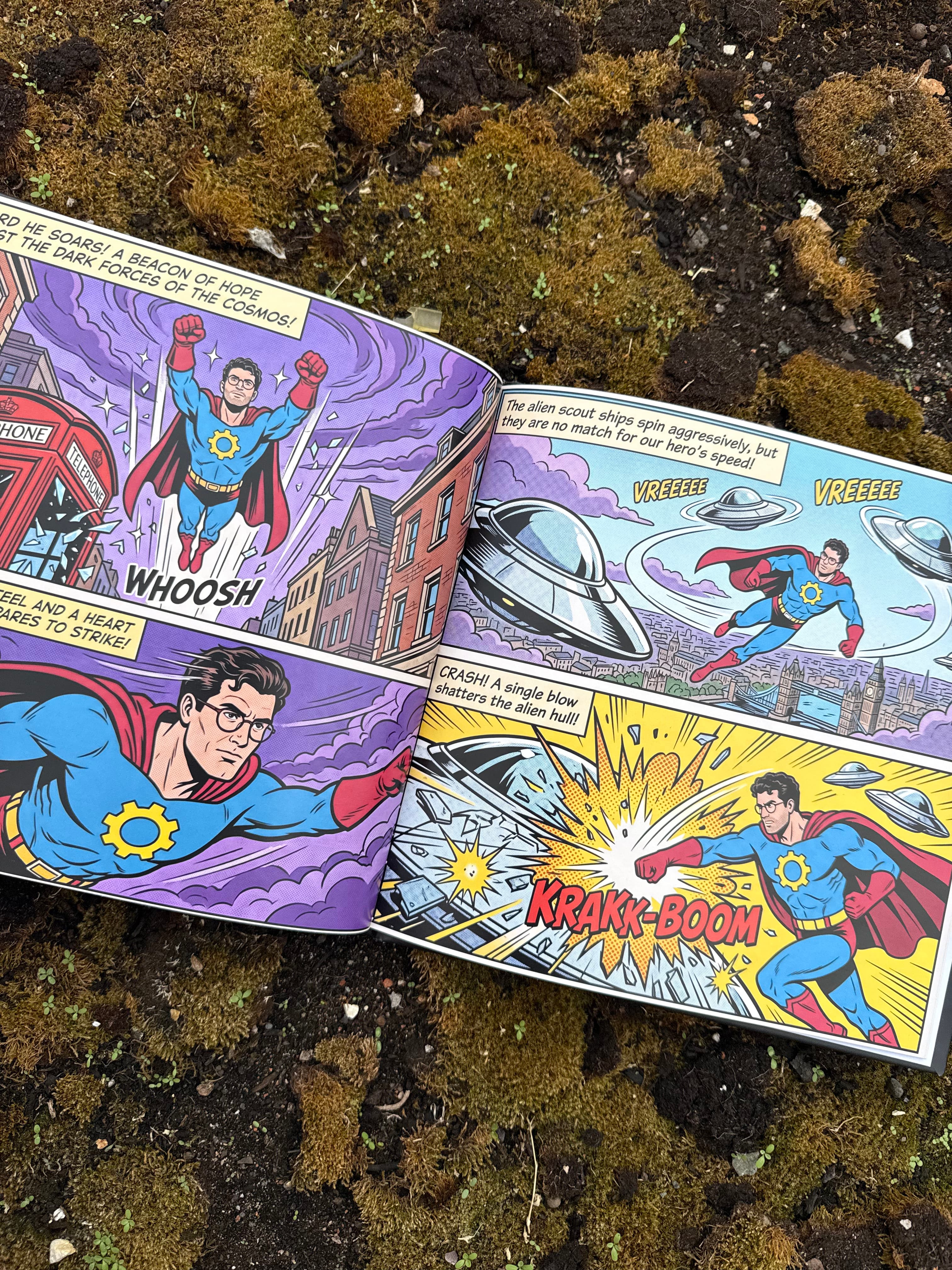
You have written a comic. Maybe it is a superhero origin story starring your daughter, a noir mystery about your best friend's disastrous first date, or a 24-page adventure you have been plotting since you were twelve. The script is done. Now comes the part that stops most people cold: turning words on a page into a printed comic book you can actually hold.
Comic printing has a reputation for being technical, and it has earned it. Bleed, trim, CMYK, saddle stitch, 300 DPI, print-ready PDFs, minimum order quantities. For a first-time creator, the jargon alone can feel like a wall. The good news is that in 2026, you have more genuinely user-friendly options than ever before, and they fall into two very different camps: platforms that print files you have already designed, and platforms that help you create the finished comic and then print it for you.
This guide compares the most user-friendly platforms for printing custom-written comic books, explains exactly what "user-friendly" should mean when you are choosing one, and helps you match the right platform to your project, whether you want a single hardcover gift or a 500-copy convention run.
Quick Answers
What is the most user-friendly platform for printing a custom-written comic book? For people who have a story but no finished artwork, Story Spark is the simplest option. You describe or write your storyline, create characters from photos, choose one of four comic art styles, edit every page, and order a premium hardcover, all in one place, with no file preparation or design software needed.
What is the easiest way to print a comic if I already have finished artwork? Mixam and Ka-Blam are the most beginner-friendly print services for creators with completed, print-ready files. Both allow single-copy orders and offer online pricing tools.
Can I print just one copy of my comic book? Yes. Story Spark, Mixam, Ka-Blam, Lulu, Blurb and Amazon KDP all allow single-copy orders. Offset printers such as PrintNinja require much larger minimum runs.
What is the cheapest way to print hundreds of comics? For runs of 500 copies or more, offset printers like PrintNinja usually offer the lowest cost per copy, though they involve longer lead times and more technical preparation.
Do I need to know how to draw to print a comic book? No. AI-assisted comic creators like Story Spark's comic book creator illustrate your story for you, keeping characters consistent from panel to panel.
What "User-Friendly" Actually Means for Comic Printing
Almost every print service describes itself as easy. The question is: easy for whom? A platform that feels effortless to a professional artist with Adobe InDesign skills can feel impossible to a parent with a story idea and a phone full of family photos. When we compare platforms in this guide, we look at seven practical factors.
This is the single biggest dividing line. Traditional printers expect a finished, correctly formatted PDF with bleed, safe margins, embedded fonts and the right color mode. If you do not know what those terms mean, that platform is not user-friendly for you, however clean its website looks.
2. Does it help you create the comic, or only print it? Some platforms are pure printers. Others include creation tools, from basic layout templates to full AI illustration. If your comic currently exists only as a script, this matters enormously.
3. Can you preview the finished book before paying? A full page-by-page preview is the best protection against expensive mistakes, such as text too small to read, art cut off at the trim line, or a character who looks different on page 14.
4. What is the minimum order? Single-copy printing is essential for gifts, proofs and first projects. Minimums of 100 or 500 copies suit established creators with an audience.
5. How transparent is the pricing? Can you see the price instantly, or do you need to request a quote and wait?
6. What formats are available? Saddle-stitched floppies, perfect-bound paperbacks and hardcovers each suit different purposes. Hardcovers are best for keepsakes and gifts.
7. How fast is delivery? Digital printers typically deliver in days. Offset printing, often done overseas, can take weeks.
Keep these seven factors in mind as you read through the platforms below. The "best" platform depends entirely on where your comic is right now and where you want it to end up.
1 Story Spark: Best for Custom-Written Comics Without Design Skills
If you have a story but no artwork, no design software and no idea what "0.125-inch bleed" means, Story Spark is built for you. It is the only platform on this list that takes you from a storyline all the way to a printed, fully illustrated hardcover comic without asking you to prepare a single file.
How it works
Story Spark's personalized comic book creator follows a simple sequence:
- Create your characters. Upload a photo of yourself, a family member, a friend or even a pet, and the character creator turns it into an illustrated comic character. You can also build characters from a written description. Up to three characters can star in each comic, and they are saved to your profile for future books.
- Write or shape your storyline. This is where "custom-written" comes in. You can describe your own plot in as much detail as you like, or choose from suggested adventures if you want a starting point. The story is built around your characters, not a fixed template.
- Pick a comic art style. Choose from four styles: American Classic, European Clear Line, Noir and Modern Comics. Our guide to comic book art styles explains which style suits which kind of story.
- Edit every page. The comic book editor lets you change the art, the text or both on any page or cover, adjust speech bubbles, customize the back cover with a photo or character illustration, and choose a dedication design with your own message.
- Preview and order. Flip through every page before you commit, then order your printed hardcover.
Print specs and pricing
Every Story Spark comic is printed as a 21cm x 21cm hardcover with a matte finish, 24 pages, in premium full color. A printed comic costs $29.99, and books are printed and dispatched within five working days. Volume discounts apply per title: 10% off for 5 to 10 copies, 20% off for 11 to 20, and 30% off for 21 or more, which makes Story Spark a practical option for party favors, family reunions or classroom projects. Full details are on the pricing page.
Story Spark currently delivers to 13 countries, including the UK, USA, Canada, Australia, the UAE and much of Western Europe. Delivery times by country are listed on the delivery information page. Paid subscribers also receive free standard shipping on book orders.
Why it ranks first for user-friendliness
The biggest technical challenge in comics is not printing. It is keeping characters looking like the same person across dozens of panels. Story Spark builds each character from a single saved profile, which is why a hero's face on page 3 matches their face on page 24. Our article on why character consistency matters explains why this is so important for comics in particular.
Story Spark also removes the file-preparation step entirely. There is no bleed to set up, no DPI to check and no color profile to convert. What you see in the preview is what gets printed.
Going beyond a gift
Story Spark is not only for one-off presents. You can export your comic as a PDF, ePub or ZIP file, and the Creator plan includes ownership of AI-generated content and watermark-free downloads, which matters if you intend to self-publish or sell your work elsewhere. You can also share your stories through the Story Spark Community Library.
Best for: First-time creators, gift-givers, parents, teachers and anyone with a story but no finished artwork.
Limitations: Comics are printed in one size (21cm x 21cm hardcover) at 24 pages. If you need a traditional US comic trim size, a saddle-stitched floppy or a 150-page graphic novel, one of the print-only services below will suit you better.
2 Mixam: Best All-Round Printer for Creators With Finished Artwork
Mixam is one of the most widely used online printers for independent comics and zines, and it earns its reputation for accessibility. If your artwork is already complete, Mixam makes the printing step about as smooth as a traditional printer can.
What makes it user-friendly: Mixam offers an instant quote calculator, so you can see the price as you adjust size, paper and binding. There is no minimum order on its book sizes, so you can print a single proof copy before committing to a larger run. Free digital proofs are included, and binding options range from stapled saddle stitch for thin issues to perfect-bound paperbacks and casebound hardcovers. Mixam also publishes free comic templates and file-setup guides, and offers a print-on-demand service for selling without holding inventory.
Where it gets harder: You are responsible for delivering correctly formatted files. Mixam recommends 300 DPI artwork with bleed and safe margins, and you need to understand these requirements before uploading. Some reviewers note that while the finished print quality is consistently praised, organizing and uploading pages can feel fiddly.
Best for: Creators who have finished pages and want flexibility over size, paper and binding, from one copy upward.
3 Ka-Blam: Best Specialist for Indie Comic Single Issues
Founded in 2005 in Orlando, Florida, Ka-Blam has focused on comic books from day one and has printed more than three million comics for independent creators. It charges no setup fees and has no minimum order, which makes it a long-standing favorite for proofs, convention stock and small runs.
What makes it user-friendly: In August 2026, Ka-Blam launched Ka-Blam 3.0, a full rebuild of its platform. The new version shows live pricing as you choose size, page count and cover stock, without needing an account just to see a number. It also moves quantities, shipping, discounts and payment onto a single checkout page.
Where it gets harder: Since January 2026, Ka-Blam requires a print-ready multi-page PDF for new orders. It has introduced a web tool to help creators build these files, but you still need finished, correctly sized artwork. Ka-Blam is a printer, not a creation tool.
Best for: Indie creators printing traditional single-issue comics, especially in the US, who want a comics specialist rather than a general printer.
4 Lulu: Best Print-on-Demand Option for Selling Directly
Lulu is one of the best-known self-publishing platforms, and it offers a dedicated comic book product at the industry-standard 6.625 x 10.25 inch size, with printing on the inside cover, a detail many general book printers do not offer. You can print one copy or more than a thousand.
What makes it user-friendly: Publishing on Lulu is free, and you only pay for the copies you order. Its order import tool lets you upload a spreadsheet of customer addresses, which is extremely useful for fulfilling crowdfunding rewards. Lulu also supports direct sales, so fans can buy your printed comic without you touching the stock.
Where it gets harder: You still need to supply a finished interior file and a cover file set up to Lulu's template. Lulu's product range is enormous, which is great for flexibility but can feel overwhelming for a first-timer.
Best for: Creators who want to sell printed comics online on demand, or fulfil Kickstarter backers without handling shipping themselves.
5 Blurb: Best for Graphic Novels and Webcomic Collections
Blurb does not offer a product labeled "comic book" in the traditional sense. Instead, it recommends its trade books, magazines and photo books for comics, graphic novels and manga. Its photo book format in particular works well for art-heavy graphic novels, with premium paper options.
What makes it user-friendly: Blurb offers its own free layout software, BookWright, plus a PDF-to-book option and Adobe integrations. Its trade books come with a free ISBN and distribution options to retailers such as Amazon.
Where it gets harder: Blurb's formats were designed for photographers and general self-publishers, so you will need to choose the right one for your comic yourself. Premium photo book pricing can also be high for longer comics.
Best for: Webcomic artists collecting work into a book, and graphic novelists who want premium presentation.
6 Amazon KDP: Best for Reaching Amazon Readers
Amazon's Kindle Direct Publishing (KDP) is free to use and gives your comic a listing on the world's largest bookstore. It offers print-on-demand paperbacks and case-laminated hardcovers, plus tools such as Kindle Create and Kindle Comic Creator for digital editions.
What makes it user-friendly: There are no upfront costs, you can order proof copies at print cost before publishing, and Amazon handles printing, shipping and customer service for every sale. For many creators, the reach alone outweighs any limitations.
Where it gets harder: KDP's print formats are built for books, not traditional comics. It does not offer stapled, saddle-stitched single issues, and its trim size options have historically not included the standard US comic size, so many creators format their comics as square-spined trade paperbacks instead. File formatting for image-heavy books also has a learning curve.
Best for: Creators whose priority is selling a comic or graphic novel to Amazon customers worldwide.
7 PrintNinja: Best for Large Offset Print Runs
When you are printing hundreds or thousands of copies, offset printing becomes dramatically cheaper per copy than digital print-on-demand. PrintNinja specializes in affordable offset printing for independent creators, with a Chicago-based team handling customer service and prepress.
What makes it user-friendly: PrintNinja's big advantage is people. Every job is hand-managed from first inquiry to delivery, many account managers are comic readers themselves, and its prepress artists review your files before printing. It also offers free sample packs so you can feel paper stocks before ordering.
Where it gets harder: The minimum order for offset comic printing is 500 copies, and production plus ocean freight means you should plan for several weeks, not days. File requirements are strict: CMYK color, 300 DPI or higher, bleed on all sides, and each page submitted separately.
Best for: Established creators and Kickstarter campaigns printing 500 or more copies, where cost per unit and color quality matter more than speed.
Honorable Mentions
Pixartprinting is a European online printer that offers custom comic printing from a single copy, with downloadable templates and a range of paper and cover finishes. It is worth considering for creators based in mainland Europe.
PublishingXpress and QinPrinting sit between print-on-demand and full offset runs, with minimums of around 25 and 100 copies respectively. They suit creators who have outgrown single copies but are not ready for 500.
Pixton is worth mentioning for a different reason. It is a popular drag-and-drop comic maker, especially in schools, but it is a creation tool rather than a book printer. You can build comic strips with it, then export them to one of the print services above.
How to Choose the Right Platform for Your Comic
The simplest way to choose is to start with where your comic is today.
You have a story idea or script, but no artwork. Choose Story Spark. It is the only option here that illustrates and prints your comic in one workflow, with no design skills needed. Start with the comic book creator.
You have finished artwork and want one or a few copies. Choose Mixam or Ka-Blam. Both print single copies and have straightforward online pricing.
You want to sell your comic online without holding stock. Choose Lulu for direct sales and crowdfunding fulfillment, or Amazon KDP for Amazon's audience.
You are collecting a webcomic or making a premium graphic novel. Choose Blurb for its layout tools and premium paper options.
You are printing 500 or more copies. Choose PrintNinja for offset quality and the lowest cost per copy at scale.
You are making a gift. Choose Story Spark. Hardcover durability, a dedication page, photo-based characters and a full preview are exactly what a keepsake needs. Browse more ideas on our personalized gifts page, or plan ahead for the festive season with a Christmas comic or a spooky Halloween comic.
Many creators end up using more than one platform. A common path is to create and gift a personalized comic on Story Spark, discover a love of comic storytelling, then move on to longer projects printed through a print-on-demand or offset service. Our complete guide on how to publish a comic book walks through every stage of that journey.
A Pre-Print Checklist for Any Platform
Whichever platform you choose, run through this checklist before you place an order.
- Read every page at print size. Speech bubbles that look fine on a large screen can become unreadable once printed. Keep lettering large and dialogue short.
- Check character consistency. Flip through the whole comic and confirm every character looks the same from the first page to the last.
- Keep important content away from the edges. Faces, text and key details should never sit on the trim line or the spine.
- Match your art style to your story. A lighthearted family adventure and a moody detective story need very different visual treatments.
- Order a single proof first. Colors, paper and binding can all look different in your hands than on screen. One proof copy is far cheaper than fixing a 100-copy mistake.
- Confirm delivery dates for gifts. Build in a buffer for printing and shipping, especially around birthdays and holidays.
- Check your rights. If you plan to sell your comic, make sure the tools you used grant you commercial rights to the content.
Frequently Asked Questions
What is the easiest way to print a comic book I wrote myself?
If you have written the story but do not have artwork, the easiest route is an all-in-one platform like Story Spark, where you describe your storyline, create characters from photos, choose an art style and order a printed hardcover. If your artwork is finished, a print-on-demand service such as Mixam or Ka-Blam is the easiest way to print it.
How much does it cost to print a single custom comic book?
Costs vary by size, page count and binding. A Story Spark hardcover comic costs $29.99 including full illustration of your story. Print-only services may charge less per copy, but you must first produce or commission the artwork, which can cost far more than the printing itself.
Can I print a comic book as a hardcover?
Yes. Story Spark prints every comic as a hardcover as standard. Mixam, Lulu, Blurb, Amazon KDP and PrintNinja also offer hardcover options, though you will need to supply print-ready files.
What size is a standard comic book?
The modern American comic standard is 6.625 x 10.25 inches. Personalized and gift comics often use square formats instead. Story Spark comics, for example, are 21cm x 21cm, which suits illustrated keepsake books.
Do I need an ISBN to print my comic book?
Only if you plan to sell through bookstores or major online retailers. You do not need an ISBN to print a comic for personal use, gifts or direct sales at events.
Can I print my comic book in the UK?
Yes. Story Spark and Mixam both serve UK customers directly, and most print-on-demand platforms deliver to the UK. Check each platform's delivery page for current timelines.
How long does comic printing take?
Digital print-on-demand services typically print and dispatch within days. Story Spark dispatches within five working days. Offset printing, such as PrintNinja's, usually takes several weeks including shipping.
Can I include real people in my comic book?
Yes. Story Spark lets you upload photos of family and friends and turns them into illustrated comic characters who stay recognizable across every panel. Always get permission from the people you include if you plan to share the comic publicly.
What is the difference between saddle stitch and perfect binding?
Saddle stitch uses staples through the fold and suits thinner single issues. Perfect binding glues pages to a flat spine and suits thicker books and graphic novels. Hardcover binding is the most durable option and is ideal for gifts and keepsakes.
Is an AI-illustrated comic good enough to print?
Yes, provided the platform keeps characters consistent and lets you review and edit every page. Story Spark's editor lets you change art and text on any page and preview the complete book before anything is printed.
The Bottom Line
The most user-friendly platform for printing a custom-written comic book depends on one question: do you already have finished artwork?
If you do, Mixam, Ka-Blam, Lulu, Blurb, Amazon KDP and PrintNinja each offer a solid path to print, from single proofs to large offset runs. If you do not, and your comic currently lives as an idea, a script or a story you have told around the dinner table, Story Spark is the easiest way to turn it into a real, fully illustrated hardcover, with characters that look like the people you love and a preview of every page before you order.
Your story is already written. The hard part is over. Create your comic book with Story Spark today, compare plans on the pricing page, or explore more guides in the Learning Centre.
Written by the Story Spark Team. Story Spark is an AI-powered platform for creating, illustrating, and printing your own books.
Related Reading
From the Story Spark Blog
- How to Publish a Comic Book: The Complete 2026 Guide: The full journey from script to printed comic, including panel layout, lettering, rights and publishing paths.
- Comic Book Art Styles Explained: From Golden Age to AI-Generated: How American Classic, European Clear Line, Noir and Modern styles developed, and which one suits your story.
- Personalized Comic Book: Turn Anyone Into a Hero: Photo and storyline tips for creating a comic book gift that feels made for one person.
- Why Character Consistency Matters: Why keeping a hero recognizable from panel to panel is essential in comics and personalized books.
- Best AI for Character Consistency in 2026: A side-by-side comparison of how Story Spark, Midjourney, Leonardo.Ai and other tools handle recurring characters.
- How to Create Your Own Characters: Simple ways to turn family, friends, pets and toys into characters you can reuse across every story.
- How to Publish Your Book and Become an Author: The next step if your comic is the start of a bigger publishing journey.
From the Story Spark Learning Centre
- The Personalized Comic Book: Turn Anyone Into a Hero: Our in-depth guide to making a personalized comic, from photo to premium hardcover keepsake.
- The Best Platforms for Creating and Printing Personalized Hardcover Books (2026 Guide): A comparison of leading hardcover book platforms on story creation, illustration, print quality and price.
- Complete AI Book Generator Comparison 2026: How Story Spark, Sudowrite, ChatGPT, Canva and others compare on features, output and print options.
- The Best Book Creators: A Complete Guide: Book creation tools for families, classrooms and self-publishers, including Story Spark, Blurb and Canva.
- The Ultimate Gifting Guide: Personalized Books for All Occasions: Ideas for birthdays, weddings, holidays and every occasion worth marking with a book.