


A few years ago, making an illustrated children's story meant finding two people: someone to write it and someone to draw it. Today, a parent at the kitchen table, a teacher planning next week's lesson, or a grandparent with a story they have told a hundred times can do both in an afternoon, with the help of AI.
The challenge is no longer whether AI can help. It is choosing the right site. Search for "AI children's story generator" and you will find dozens of tools, from free chat assistants to dedicated book creators, and they are far from equal. Some write a story but leave you to find the pictures. Some make lovely single images but cannot keep your character looking the same on page two. Some produce a digital file. Others print a real hardcover book and send it to your door.
This guide shows you the best AI sites that help write and illustrate children's stories in 2026, explains what each one does well, and helps you pick the right one for bedtime, gifts, the classroom or self-publishing.
Quick Answers
What is the best AI site to write and illustrate a children's story? Story Spark is the most complete option. It can write the story for you, illustrate a story you have written yourself, or let you build a book from a blank canvas, with characters made from photos that stay consistent on every page. You can then order it as a premium hardcover.
Is there a free AI site that writes and illustrates children's stories? Yes. Google's Gemini Storybook creates free 10-page illustrated stories with narration, and Story Spark's free plan lets you create, edit and print your own books. Paid plans unlock more advanced AI tools.
Can AI illustrate a children's story I have already written? Yes. Story Spark's Storybook Illustrator lets you paste your own text and have every page illustrated in your chosen style, with no AI writing involved. Childbook.ai also offers an illustrator workflow for manuscripts.
Can I print an AI-illustrated children's book? Yes, but not every site offers printing. Story Spark prints every book as a hardcover. Tools like Gemini and Canva produce digital files you would need to print elsewhere.
Which AI story site is best for teachers? StoryWizard.ai is built around classroom exercises and student accounts. Story Spark is a strong choice for teachers who want printed, curriculum-themed storybooks.
What to Look For in an AI Site for Children's Stories
Before comparing individual sites, it helps to know what separates a genuinely useful tool from a novelty. These are the six features that matter most.
1 Writing support that fits how you work. Some people want the AI to write everything from a one-line idea. Others have already written their story and only need pictures. The best sites support both, plus a manual option for people who want full control.
2 Illustration that matches the story. Look for a range of illustration styles, from soft watercolor to bold cartoon, and the ability to regenerate or edit individual pictures.
3 Character consistency. This is the feature most tools get wrong. A children's story only works if the hero looks like the same child on every page. Tools that generate each image independently often produce a different-looking character from scene to scene. Our guide to why character consistency matters explains why this is so important.
4 Photo-to-character creation. Many families want their child, a grandparent or even the family dog to star in the story. The strongest sites turn a photo into an illustrated character and save it for future books.
5 Editing and preview. A first draft from any AI is a starting point. You should be able to change words and pictures, then preview every page before anything is final.
6 What you get at the end. Decide early whether you want an on-screen story, a downloadable file or a printed book. This single question rules many sites in or out.
1 Story Spark: Best Overall AI Site for Writing and Illustrating Children's Stories
Story Spark is an AI book creation platform trusted by more than 200,000 creators, with over 170,000 storybooks made so far. It was built specifically for illustrated books rather than adapted from a general design or chat tool, and that shows in how the writing, illustration and printing all fit together.
Three ways to create a story
Story Spark's Storybook Creator gives you as much or as little AI help as you want:
- AI Story Generator. Describe your idea in your own words, choose a language and text style, add your characters, and Story Spark writes the story and illustrates every page in the style you pick.
- Storybook Illustrator. Paste or type a story you have already written, and Story Spark illustrates every page without changing your words. This is ideal for aspiring authors, grandparents with a family tale, or children who have written their own story.
- Blank Canvas. Start from an empty book with professional formatting built in. Write your own text, upload your own images, turn photos into matching illustrations, and design or upload your own cover.
Characters that look like the people you love
The character creator lets you build a character from scratch, turn a photo of a child, parent, grandparent, pet or favorite toy into an illustrated character, or choose from a library of ready-made characters. Characters are saved to your profile, so the same hero can star in a birthday book this month and a holiday adventure next year. A single illustration can include up to four characters, which makes stories about siblings, cousins or the whole family easy to create.
A full editor, not just a generator
Once your story exists, the storybook editor lets you:
- Edit text, pages, covers and images at any time
- Use Illustrate My Photo to turn a family picture or a child's drawing into an illustration that matches your book's style
- Ask Spark, the in-editor writing assistant, to refine a sentence or suggest alternatives when you are stuck
- Preview every page exactly as it will print
- Export as PDF, EPUB or PNG files
Text style options include settings designed for accessibility and neurodivergent readers, and stories can be created in many languages. Audio narration and voice cloning are available too, so a parent can record their voice once and use it across stories, which is especially lovely for bedtime stories.
Printed hardcover storybooks
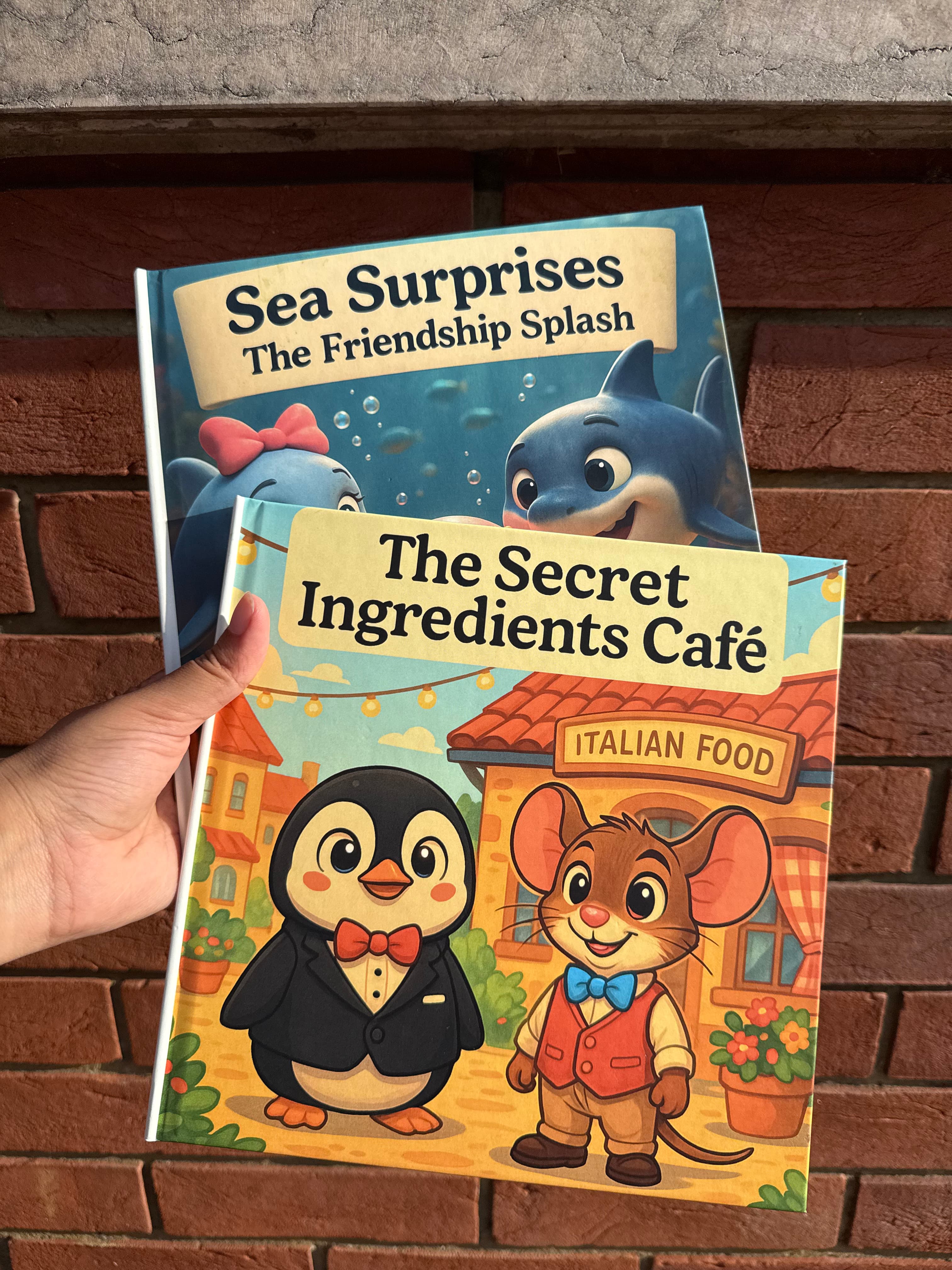
This is where Story Spark stands apart from most AI story sites. Every storybook can be ordered as a 21cm x 21cm hardcover with a matte finish and premium color print, including a dedication area for a personal message, your name and a photo. Printed storybooks start at $29.99 for 24 pages, rising to $49.99 for 64 pages, and are printed and dispatched within five working days. Story Spark delivers to 13 countries, including the UK, USA, Canada, Australia and much of Europe; see the delivery information page for timelines.
Pricing
The Free plan lets you create and print your own books at no cost. The Dreamer plan ($9.99 a month) unlocks the AI story generator, AI illustration and character creation, plus free standard shipping. The Creator plan ($39.99 a month) adds higher usage limits, audio narration, ownership of AI-generated content and watermark-free downloads, which matters if you plan to self-publish and sell your books. Full details are on the pricing page.
More than picture books
The same account also lets you create personalized comic books, search-and-find books and longer illustrated books and novels. Teachers can build educational storybooks around math, science, history, languages or emotional learning, and you can browse thousands of stories by other creators in the Community Library for inspiration.
Best for: Parents, grandparents, teachers and first-time authors who want an original illustrated story, consistent characters and a real printed book.
2 Gemini Storybook: Best Free Option for Quick Digital Stories
Google added a Storybook feature to its Gemini app in August last year. You describe the story you want, optionally add photos, files or a child's drawing for inspiration, and Gemini creates a 10-page illustrated storybook with read-aloud narration. It supports a wide range of art styles, from pixel art and comics to claymation and coloring book pages, and works in more than 45 languages.
What it does well: It is free, fast and genuinely impressive for a quick bedtime story or for explaining a topic, such as the solar system, to a young child. Narration is a useful touch for pre-readers.
Where it falls short: Stories are capped at 10 pages, and Gemini is a general-purpose assistant rather than a dedicated book creator. There is no built-in print ordering, and independent reviewers note that keeping a photo-based character consistent across a whole book is not its main strength. If you want a keepsake, you will need to take the output elsewhere.
Best for: Families who want a free, one-off digital story in a few minutes.
3 Childbook.ai: Best Budget Option for Digital Books
Childbook.ai turns an idea or an existing manuscript into a complete children's book with text, illustrations and page layouts. You can create a character from a photo, and there is a dedicated illustrator workflow if you have already written your story.
What it does well: Pricing is low. A single book credit costs $2.50, the Hobby plan is $19 a month for up to 20 books, and the Premium plan at $29 a month adds a credit toward a printed softcover. Childbook.ai also has a Canva app for extra design control.
Where it falls short: Independent reviews are mixed on how closely photo-based characters resemble the real child, and printing is an extra step on top of a subscription.
Best for: Budget-conscious families or authors who want to test the idea of AI storybooks before committing to a keepsake.
4 StoryWizard.ai: Best for Classroom Reading Practice
StoryWizard.ai is designed around education. Teachers and parents can generate illustrated stories tailored to a child's interests and reading level, with built-in narration, a word dictionary and learning exercises.
What it does well: The classroom focus is clear. Teacher plans cost $10 a month for up to 10 students and $29 a month for up to 40, with a seven-day free trial, and student creations can be downloaded as PDFs.
Where it falls short: It is built for reading practice rather than keepsake books, so there is less emphasis on premium printed output or photo-based personalization.
Best for: Teachers, tutors and homeschooling families focused on literacy skills.
5 Canva: Best for Design-Confident Users
Canva is not a children's book creator in itself, but many people use it to build one. Magic Write, its AI writing tool, can draft a story, its AI image tools can generate pictures, and apps in its marketplace add storybook-specific features. Canva's templates then help you lay out pages.
What it does well: Enormous design flexibility, familiar tools and plenty of templates.
Where it falls short: You assemble everything yourself. Each image is generated separately, so keeping a character consistent across a whole book takes careful manual work, and there is no built-in children's book printing, so you need to export files to a separate printer.
Best for: People already comfortable with Canva who enjoy hands-on design.
6 ChatGPT and Other AI Assistants: Best for Brainstorming
General AI assistants such as ChatGPT can write a children's story in seconds and generate illustrations on request. They are excellent for brainstorming titles, outlines, character names and rhymes.
Where they fall short: They are built for conversation, not books. Generating 24 matching illustrations of the same character is difficult, there is no page layout or print option, and turning the result into a finished book requires other tools. Many people use an assistant to draft ideas, then paste their story into a dedicated tool like Story Spark's Storybook Illustrator to produce the finished book.
Best for: Early ideas and first drafts.
7 Book Creator: Best for Multimedia Classroom Projects
Book Creator is a well-established classroom tool for making digital books that combine text, images, audio and video. It has added AI image features and supports collaborative projects within school accounts.
Where it falls short: It is fundamentally a page-layout tool for digital books, with little guided story writing and no system for keeping AI-generated characters consistent across pages.
Best for: Schools creating interactive digital projects with students. For a closer look, see our comparison of Story Spark vs Book Creator.
Honorable Mentions
Oscar Stories creates personalized AI bedtime stories with illustrations and can turn them into audiobooks, making it a nice option for nightly listening.
Wonderbly and Magic Story are popular for personalized gift books, but they place a child's name or likeness into pre-written stories rather than writing an original one, so they suit families who want a ready-made story more than a creative project.
How to Choose the Right AI Story Site
Start with what you want to end up with, then work backwards.
You want a printed keepsake or gift. Choose Story Spark. It is the only site in this list that combines original AI writing, consistent photo-based characters and a premium hardcover. Browse occasion ideas on our personalized gifts page.
You have already written a story and need illustrations. Choose Story Spark's Storybook Illustrator, or Childbook.ai if you only need a digital version.
You want a free story tonight. Try Gemini Storybook for a quick digital book, or start a free Story Spark account if you might want to print it later.
You are a teacher. Choose StoryWizard.ai for reading exercises and student accounts, or Story Spark for printed educational storybooks built around your curriculum.
You want to self-publish and sell. Choose Story Spark's Creator plan for content ownership and watermark-free exports. Our guide on how to get a children's book published covers the next steps.
You love hands-on design. Canva gives you the most layout control, provided you are happy to manage character consistency and printing yourself.
How to Write and Illustrate a Children's Story With AI: Step by Step
Here is how the process works on Story Spark, from idea to printed book.
- Start with one clear idea. The best children's stories have a simple core: a character who wants something, a problem in the way and a satisfying ending. "A shy hedgehog who wants to join the school choir" is a stronger starting point than "a story about animals."
- Create your characters. Upload a clear, well-lit photo or describe your character's name, look and personality. Keep two or three defining details, such as curly red hair, round glasses and a favorite yellow raincoat.
- Choose how much the AI writes. Let the AI Story Generator draft the whole story, paste in your own words for the Storybook Illustrator, or start from a blank canvas.
- Pick an illustration style. Match the style to the mood. Soft watercolor suits gentle bedtime stories, while bold cartoon styles suit adventures.
- Edit and refine. Read the story aloud. Shorten long sentences, adjust words for your child's age, and use the Spark writing assistant for tricky lines. Regenerate or edit any picture that does not feel right.
- Personalize the details. Add a dedication, your name as the creator and a photo. These small touches turn a story into a keepsake.
- Preview every page. Check that characters look the same throughout and that text is easy to read.
- Print or share. Order a hardcover, export a digital copy, or both.
Our guide on how to make a children's book your child will actually love shares more storytelling tips.
Tips for Better AI-Written Children's Stories
- Write for the age, not the adult. Toddlers love repetition and rhythm. Early readers need short sentences. Older children enjoy richer plots and new vocabulary.
- Include real details. A child's favorite snack, their pet's silly habit or the name of their street makes a story feel unmistakably theirs.
- Keep one idea per page. Picture books work best when each page has one moment and one illustration.
- Read it aloud before printing. Rhythm problems and awkward phrases are much easier to hear than to see.
- Let children help. Ask your child to choose the hero's name, the setting or the ending. Co-creating a story is a wonderful way to build confidence and a love of reading.
- Reuse your characters. A saved character can become a series, giving your child a hero who grows alongside them.
Safety and Privacy: What Parents Should Check
AI story tools for children should be held to a higher standard than general AI tools. Before you upload a photo or share personal details, check the following:
- Content safeguards. The site should clearly state how it keeps stories and images age-appropriate.
- Photo privacy. Look for a clear privacy policy explaining how photos are stored and whether they are used to train AI models. Story Spark keeps uploaded photos private to your account and does not use them to train public AI models.
- Supervision. General AI assistants are designed for adults. If your child will use a tool directly, choose one built for families and supervise their use.
- Transparent pricing. Check what is free, what requires a subscription and what printing costs before you begin.
Our guide on choosing an AI story generator for kids includes a full eight-point checklist.
Frequently Asked Questions
What AI sites help write and illustrate children's stories? The leading options in 2026 are Story Spark, Google Gemini Storybook, Childbook.ai, StoryWizard.ai, Canva, general AI assistants like ChatGPT, and Book Creator. Story Spark is the most complete, covering writing, illustration, character consistency and printed hardcovers in one place.
Can AI write a children's book for me? Yes. AI can write a full children's story from a short description of your idea, including your child's name, interests and a lesson you want to share. Most parents and authors then edit the draft to add personal details and adjust the tone.
Can I use AI to illustrate my own children's story? Yes. Story Spark's Storybook Illustrator illustrates your own text page by page without changing your words, and you can choose from more than 10 illustration styles.
How do I keep my character looking the same on every page? Use a site that saves your character as a reusable profile rather than generating each image from scratch. Story Spark's character creator does this, so the same face, hair and outfit appear throughout your book.
Can I turn a photo of my child into a storybook character? Yes. Story Spark, Childbook.ai and several other sites turn a photo into an illustrated character. On Story Spark, the character is saved to your profile for future stories.
How much does it cost to make an AI-illustrated children's book? Costs range from free (Gemini Storybook or Story Spark's free plan) to around $10 to $40 a month for AI subscriptions. A printed Story Spark hardcover storybook starts at $29.99 per book.
Can I sell a children's book made with AI? Yes, as long as the tool's terms give you the rights. Story Spark's Creator plan includes ownership of AI-generated content and watermark-free exports, so you can sell your book beyond the platform.
How long does it take to create an illustrated children's story with AI? A first draft can take minutes. Most people spend under an hour refining the text and pictures. Printed Story Spark books are dispatched within five working days.
Are AI story sites suitable for children with additional needs? The better ones are. Story Spark includes text style options for accessibility and neurodivergent readers, and narration can support early or reluctant readers.
Is there an AI site that prints children's books as hardcovers? Yes. Story Spark prints every storybook as a premium 21cm x 21cm hardcover, with no minimum order and volume discounts for five or more copies.
The Bottom Line
There are plenty of AI sites that can write a children's story, and plenty that can generate a pretty picture. Far fewer can do both well, keep a character recognizable from the first page to the last, and turn the result into a book a child will want to read again and again.
If you want a quick free story, Gemini Storybook is a great place to experiment. If you are a teacher focused on reading practice, StoryWizard.ai is worth a look. But if you want to write, illustrate and hold a real storybook starring the people you love, Story Spark brings every step together in one place.
Your story is waiting. Create your storybook with Story Spark today, or explore plans and pricing to find the right fit.
Related Reading
From the Story Spark Blog
- 9 Best AI Photo-to-Storybook Tools (2026): Which tools turn a photo into a storybook character that actually looks like your child.
- AI Story Generator for Kids: How to Choose the Right One: An eight-point checklist covering safety, personalization and print.
- Best AI for Character Consistency in 2026: How Story Spark, Midjourney, Leonardo.Ai and others handle recurring characters.
- How to Create Your Own Characters: Turning family, pets and toys into story stars.
- A Checklist for Aspiring Children's Book Writers: Everything to check before you publish your first book.
From the Story Spark Learning Centre
- The Best AI Children's Book Creators in 2026: Six tools tested on story support, illustration, consistency and print.
- The Best AI Story Generators of 2026: A complete guide to AI story tools for kids and families.
- The Best Storybook Creators: The Complete Guide: Storybook tools for parents, educators and first-time authors.
- How To Be A Children's Author On Story Spark: From illustrations and copyright to printing your first book.
- The Definitive Parent's Handbook for Bedtime Stories: Making bedtime stories a cherished family routine.
Written by the Story Spark Team. Story Spark is a platform for creating, illustrating, and printing your own books.